Examples
Outline
Examples
Bucket tool
As an example, the bucket tool is applied at coordinates (0,0) to the first image. The output is on the other three images at incresing level of sensitivity.
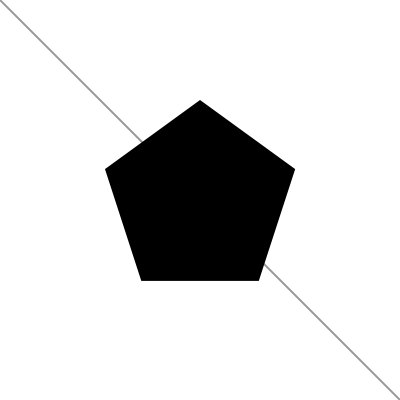 |
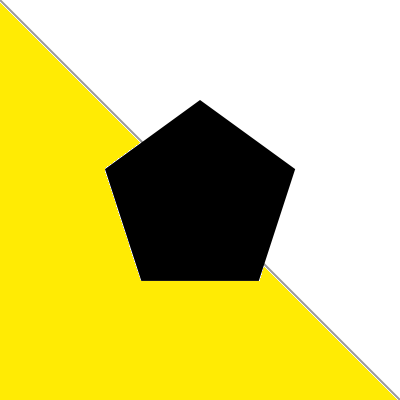 |
 |
 |
SpriteRenderer spriteRenderer = GetComponent<SpriteRenderer>();
Drawer drawer = new Drawer(spriteRenderer);
drawer.NewEmptySprite(4, 4, 100, Color.white);

LineStyle style = new LineStyle(2.0f/100.0f, new Color(0.6f, 0.6f, 0.6f));
BrokenLine line = new BrokenLine(new Vector2[2] { new Vector2(4,0), new Vector2(0,4)}, false, style);
drawer.Draw(line);

PolygonRegular pentagon = new PolygonRegular(5, new Vector2(2, 2), new Vector2(2, 2), Color.black);
drawer.Draw(pentagon, true);

Undoer undo = GetComponent<Undoer>();
drawer.SavePng("Bucket_exe1");

drawer.Bucket(new Vector2(0,0), Color.yellow, 0.0f, true);
drawer.SavePng("Bucket_exe2");

undo.Undo(); // Undoing the last bucket
drawer.Bucket(new Vector2(0,0), Color.yellow, 0.5f, true);
drawer.SavePng("Bucket_exe3");

undo.Undo(); // Undoing the last bucket
drawer.Bucket(new Vector2(0,0), Color.yellow, 1, true);
drawer.SavePng("Bucket_exe4");
Transformations
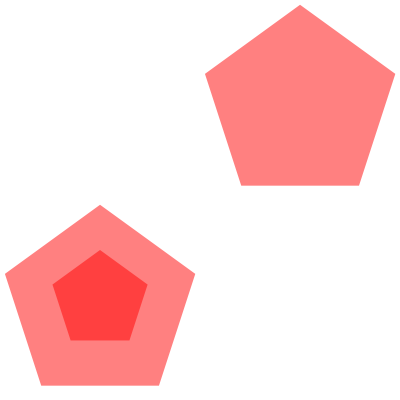
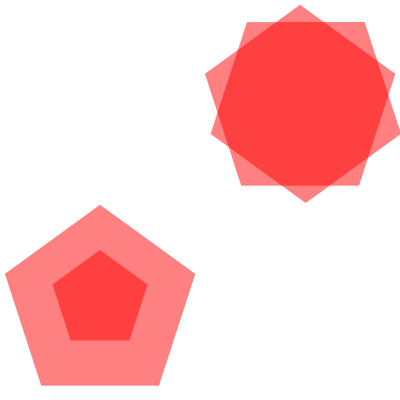
The initial pentagon is first expanded through a deformation, then translated and then rotated. Note that deformation and rotation are with respect the relative center of the polygon which, by definition, is the center of the minimal rectangle containing the verices. In this case this center does not correspond to the circle-center of the pentagon (the center of the circle in which the polygon is inscribed). This results in asymmetries in the deformation and rotation.
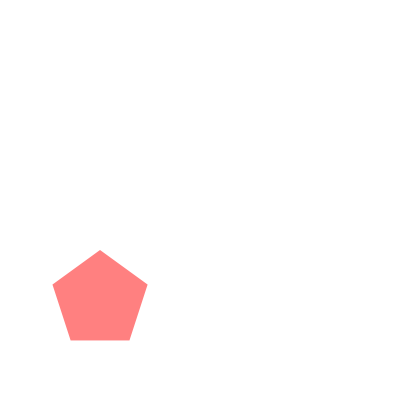 |
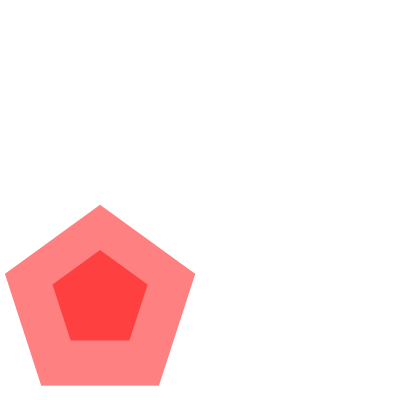 |
 |
 |
SpriteRenderer spriteRenderer = GetComponent<SpriteRenderer>();
Drawer drawer = new Drawer(spriteRenderer);
drawer.NewEmptySprite(4, 4, 100, Color.white);

PolygonRegular pentagon = new PolygonRegular(5, new Vector2(1, 1), new Vector2(1, 1), new Color(1, 0, 0, 0.5f));
drawer.Draw(pentagon);
drawer.SavePng("Transf_exe1");

pentagon.Deform(Axis.x, 2f);
pentagon.Deform(Axis.y, 2f);
drawer.Draw(pentagon);
drawer.SavePng("Transf_exe2");

pentagon.Translate(new Vector2(2, 2));
drawer.Draw(pentagon);
drawer.SavePng("Transf_exe3");

pentagon.Rotate(Mathf.PI / 5.0f, Vector2.zero);
drawer.Draw(pentagon);
drawer.SavePng("Transf_exe4");
Bezier curves
Quadratic curve
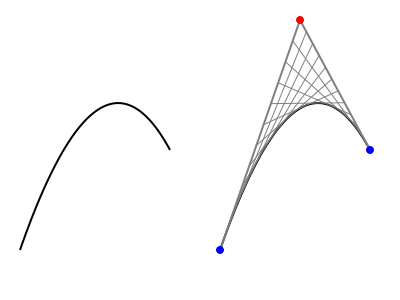
On the left the quadratic Bezier curve. On the right the same curve with the geometrical procedure underlying the definition of the Bezier curve. The blue points are the initial and final points (p1, p3), the red point is the control point.
SpriteRenderer spriteRenderer = GetComponent<SpriteRenderer>();
Drawer drawer = new Drawer(spriteRenderer);
drawer.NewEmptySprite(4, 3, 100, Color.white);

// First Bezier curve
Vector2 p1 = new Vector2(0.2f, 0.5f);
Vector2 p2 = new Vector2(1f, 2.8f);
Vector2 p3 = new Vector2(1.7f, 1.5f);
BezierCurve bc = new BezierCurve(p1, p2, p3, 2.0f/100f);
drawer.Draw(bc);

// Same Bezier curve translated
Vector2 translation = new Vector2(2, 0);
bc.Translate(translation);
drawer.Draw(bc);

// Envelop
p1 += translation;
p2 += translation;
p3 += translation;
LineStyle blOutStyle = new LineStyle(2.0f/100f, Color.gray);
BrokenLine blOut = new BrokenLine(new Vector2[3] { p1, p2, p3 }, false, blOutStyle);
drawer.Draw(blOut);
int nSteps = 10;
LineStyle blInStyle = new LineStyle(1.0f/100f, Color.gray);
for (int i=0; i<nSteps; i++){
    Vector2 pA = Vector2.Lerp(p1, p2, (i + 1)/(float)(nSteps + 1));
    Vector2 pB = Vector2.Lerp(p2, p3, (i + 1)/(float)(nSteps + 1));
    BrokenLine blIn = new BrokenLine(new Vector2[2] { pA, pB }, false, blInStyle);
    drawer.Draw(blIn);
}

// Highlighting the Bezier curve points
Circle point1Circ = new Circle(p1, 0.04f, Color.blue);
drawer.Draw(point1Circ);
Circle point2Circ = new Circle(p2, 0.04f, Color.red);
drawer.Draw(point2Circ);
Circle point3Circ = new Circle(p3, 0.04f, Color.blue);
drawer.Draw(point3Circ);

drawer.SavePng("BezierQuad");
Cubic curve
On the left the cubic Bezier curve. On the right the same curve with the geometrical procedure underlying the definition of the Bezier curve. The blue points are the initial and final points (p1, p4), the red points are the control points.

SpriteRenderer spriteRenderer = GetComponent<SpriteRenderer>();
Drawer drawer = new Drawer(spriteRenderer);
drawer.NewEmptySprite(4, 3, 150, Color.white);

// First Bezier curve
Vector2 p1 = new Vector2(0.2f, 0.5f);
Vector2 p2 = new Vector2(0.4f, 2.8f);
Vector2 p3 = new Vector2(1.7f, 1.8f);
Vector2 p4 = new Vector2(1.5f, 0.7f);
BezierCurve bc = new BezierCurve(p1, p2, p3, p4, 2.0f/100f);
drawer.Draw(bc);

// Same Bezier curve translated
Vector2 translation = new Vector2(2, 0);
bc.Translate(translation);
drawer.Draw(bc);

// Envelop
p1 += translation;
p2 += translation;
p3 += translation;
p4 += translation;
LineStyle blOutStyle = new LineStyle(2.0f/100f, Color.gray);
BrokenLine blOut = new BrokenLine(new Vector2[4] { p1, p2, p3, p4 }, false, blOutStyle);
drawer.Draw(blOut);
int nSteps = 12;
LineStyle blInStyle = new LineStyle(1.0f/100f, Color.white * 0.85f);
LineStyle blIn1Style = new LineStyle(1.0f/100f, Color.gray);
for (int i=0; i<nSteps; i++){
    Vector2 pA = Vector2.Lerp(p1, p2, (i + 1)/(float)(nSteps + 1));
    Vector2 pB = Vector2.Lerp(p2, p3, (i + 1)/(float)(nSteps + 1));
    Vector2 pC = Vector2.Lerp(p3, p4, (i + 1)/(float)(nSteps + 1));
    BrokenLine blIn = new BrokenLine(new Vector2[3] { pA, pB, pC }, false, blInStyle);
    Vector2 pA1 = Vector2.Lerp(pA, pB, (i + 1)/(float)(nSteps + 1));
    Vector2 pB1 = Vector2.Lerp(pB, pC, (i + 1)/(float)(nSteps + 1));
    BrokenLine blIn1 = new BrokenLine(new Vector2[2] { pA1, pB1 }, false, blIn1Style);
    drawer.Draw(blIn);
    drawer.Draw(blIn1);
}

// Highlighting the Bezier curve points
Circle point1Circ = new Circle(p1, 0.04f, Color.blue);
drawer.Draw(point1Circ);
Circle point2Circ = new Circle(p2, 0.04f, Color.red);
drawer.Draw(point2Circ);
Circle point3Circ = new Circle(p3, 0.04f, Color.red);
drawer.Draw(point3Circ);
Circle point4Circ = new Circle(p4, 0.04f, Color.blue);
drawer.Draw(point4Circ);

drawer.SavePng("BezierCubic");
Polygon self intersections
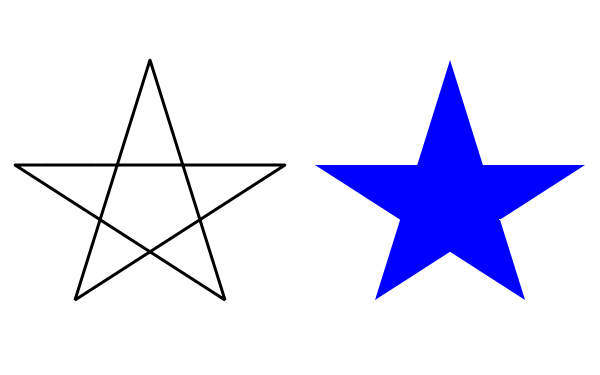
Here we draw first the broken line forming a star. The same points used for the star are passed to the Polygon constructor.
The algorithm recognizes the self intersections and draws the external path of the segments.
SpriteRenderer spriteRenderer = GetComponent<SpriteRenderer>();
Drawer drawer = new Drawer(spriteRenderer);
drawer.NewEmptySprite(4, 2.5f, 150, Color.white);

Vector2[] points = new Vector2[5]{
    new Vector2(0.5f, 0.5f),
    new Vector2(1.0f, 2.1f),
    new Vector2(1.5f, 0.5f),
    new Vector2(0.1f, 1.4f),
    new Vector2(1.9f, 1.4f),
};
BrokenLine starLines = new BrokenLine(points, true, new LineStyle(0.02f, Color.black));
drawer.Draw(starLines);

starLines.Translate(new Vector2(2, 0));
Polygon star = new Polygon(starLines.Points, Color.blue);
drawer.Draw(star);
Composite shape
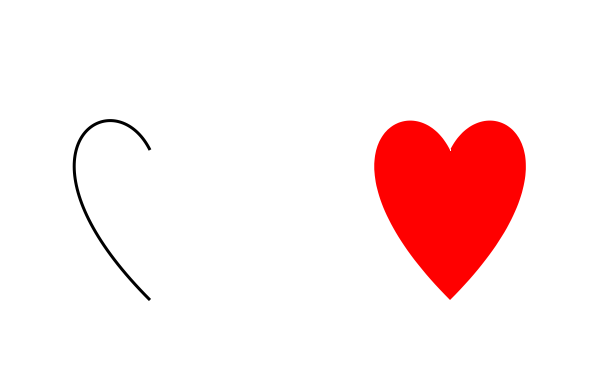
The composite shapes is delimited by generic curves. The Bezier curve on the left is joined together a simmetrical curve to create the heart shape on the right.
SpriteRenderer spriteRenderer = GetComponent<SpriteRenderer>();
Drawer drawer = new Drawer(spriteRenderer);
drawer.NewEmptySprite(4, 2.5f, 150, Color.white);

BezierCurve c1 = new BezierCurve(
    new Vector2(1.0f, 0.5f),
    new Vector2(0, 1.5f),
    new Vector2(0.75f, 2),
    new Vector2(1, 1.5f),
    0.02f
);
drawer.Draw(c1);

BezierCurve c2 = new BezierCurve(
    new Vector2(1.0f, 0.5f),
    new Vector2(2, 1.5f),
    new Vector2(1.25f, 2),
    new Vector2(1, 1.5f),
    0.02f
);

CompositeShape sh = new CompositeShape(new IDrawableLine[2]{c1, c2}, Color.red);
sh.Translate(new Vector2(2, 0));
drawer.Draw(sh);
Texture merging
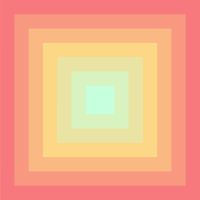
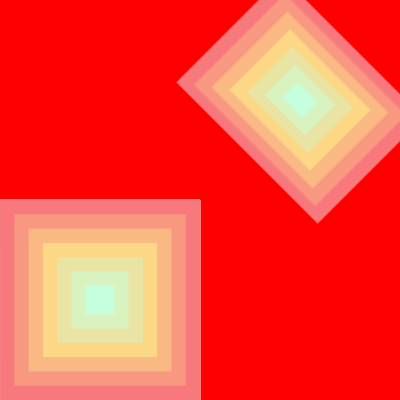
The small texture on the left is first generated, exported and then drawn twice on the bigger texture on the right. In the second case the texture is also transformed before being merged on the canvas.
 |
 |
// Main renderer over which the new texture will be merged
SpriteRenderer spriteRenderer = GetComponent<SpriteRenderer>();
Drawer drawer1 = new Drawer(spriteRenderer);
drawer1.NewEmptySprite(4, 4, 100, Color.red);

// Creating a first smaller texture on a new Sprite renderer
GameObject auxGO = new GameObject();
SpriteRenderer auxRenderer = auxGO.AddComponent<SpriteRenderer>();
Drawer drawer2 = new Drawer(auxRenderer);
drawer2.NewEmptySprite(2, 2, 100, Color.white);

// Drawing something on the first smaller texture
List<Color> gradCols = new List<Color> {
    ColorUtils.ColorHEX("#C6FFDD"),
    ColorUtils.ColorHEX("#FBD786"),
    ColorUtils.ColorHEX("#f7797d")
};
int nCols = 7;
Vector2 center = new Vector2(1, 1);
for (int i = nCols-1; i >= 0; i--){
    Color color = ColorUtils.Gradient(i / (float)(nCols - 1), gradCols);
    Quad quad = new Quad(center, 2 * (i + 1) / (float)nCols, color);
    drawer2.Draw(quad);
}
drawer2.SavePng("Texture_small_exe");

// Converting the auxiliary smaller texture in an object that can be
// drawn by the Drawer
DrawableTexture dText = new DrawableTexture(auxRenderer.sprite, Vector2.zero);
// Drawing the auxiliary texture on the main texture
drawer1.Draw(dText);

// Transforming the small texture and drawing it again
dText.Translate(new Vector2(2, 2));
dText.Deform(Axis.x, 0.75f);
dText.Rotate(Mathf.PI / 4.0f, Vector2.zero, true);
drawer1.Draw(dText);

drawer1.SavePng("Texture_exe");
Drawings
Optical pentagon

SpriteRenderer spriteRenderer = GetComponent<SpriteRenderer>();
Drawer drawer = new Drawer(spriteRenderer);
drawer.NewEmptySprite(4, 4, 100, Color.white);

float maxSide = 4 * 2;
float sideStep = 0.18f;
float rotStep = 3.5f;
float driftStep = 0.015f;

Color color = Color.black;
float rot = 0;
Vector2 center = new Vector2(2, 2);
for (float r = maxSide; r > 0.1f; r -= sideStep)
{
    PolygonRegular poli = new PolygonRegular(5, center, new Vector2(r, r), rot, color, new LineStyle());
    if (color == Color.black) color = Color.white;
    else color = Color.black;
    rot += rotStep;
    center = new Vector2(center.x, center.y + driftStep);
    drawer.Draw(poli);
}
Random texture spawning
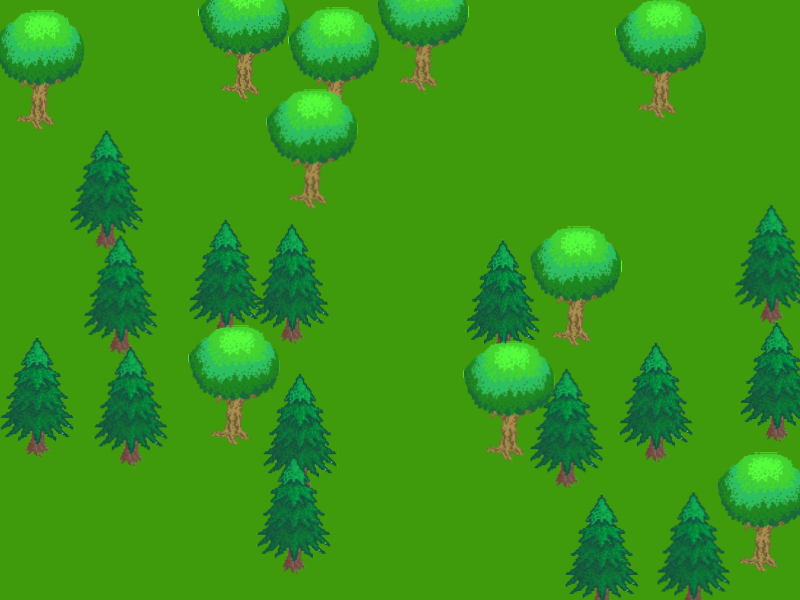
This example randomly spawns trees on a green background. In many cases can be computationally convenient to minimize the number of objects on a scenes ad therefore having a single texture containing the trees that several instances of the trees in separate textures.
SpriteRenderer spriteRenderer = GetComponent<SpriteRenderer>();
Drawer drawer = new Drawer(spriteRenderer);
float wCanvas = 8, hCanvas = 6;
drawer.NewEmptySprite(wCanvas, hCanvas, 100, ColorUtils.ColorHEX("#3f9b0b"));

// Importing the trees from the Resources folder and converting into Drawables
Sprite tree1 = Resources.Load<Sprite>("tree1");
Sprite tree2 = Resources.Load<Sprite>("tree2");
DrawableTexture dTree1 = new DrawableTexture(tree1, Vector2.zero);
dTree1.Deform(Axis.x, 0.15f, 0, false);
dTree1.Deform(Axis.y, 0.15f, 0, false);
DrawableTexture dTree2 = new DrawableTexture(tree2, Vector2.zero);
dTree2.Deform(Axis.x, 0.15f, 0, false);
dTree2.Deform(Axis.y, 0.15f, 0, false);

// Set the seed for reproducibility
Random.InitState(1);

int nTrees = 25;

// Simple random spawining algorithm (almost) without overlap
// A grid is built and each cell is stored in the availableSpots
int nXSpots = Mathf.CeilToInt(wCanvas / dTree1.Size.x);
int nYSpots = Mathf.CeilToInt(hCanvas / dTree1.Size.y);
List<int> availableSpots = new List<int>();
for(int i=0; i<nXSpots * nYSpots; i++) availableSpots.Add(i);
// Random choosing the cells in the grid where the tree will be drawn
List<int> spawnedSpots = new List<int>();
for (int i=0; i<nTrees; i++){
    // Exctrating the cell and its coordinates
    int iSpot = availableSpots[Random.Range(0, availableSpots.Count - 1)];
    spawnedSpots.Add(iSpot);
    // Removing the cell from the availabe spots
    availableSpots.Remove(iSpot);
}

// Sorting the cells in a way that the ones in the background
// are not spawned in front
spawnedSpots.Sort();

float spotRandFract = 0.5f;
float xRand = spotRandFract * dTree1.Size.x, yRand = spotRandFract * dTree1.Size.y;
for (int i = nTrees - 1; i >= 0; i--){

    // Random choice between the two trees
    float p = Random.Range(0.0f, 1.0f);
    DrawableTexture tree;
    if (p > 0.5f) tree = dTree1;
    else tree = dTree2;

    int iSpot = spawnedSpots[i];
    float xSpot = iSpot % nXSpots * dTree1.Size.x;
    float ySpot = (iSpot - xSpot) / (float)nXSpots * dTree1.Size.y;
    // Add a small random shift to the cell poistion
    float x = xSpot + Random.Range(-xRand, xRand) * 0.5f;
    float y = ySpot + Random.Range(-yRand, yRand) * 0.5f;
    tree.Translate(new Vector2(x, y) - tree.Origin);
    drawer.Draw(tree);
}
Ellipses
Drawing with semi transparent ellipses.
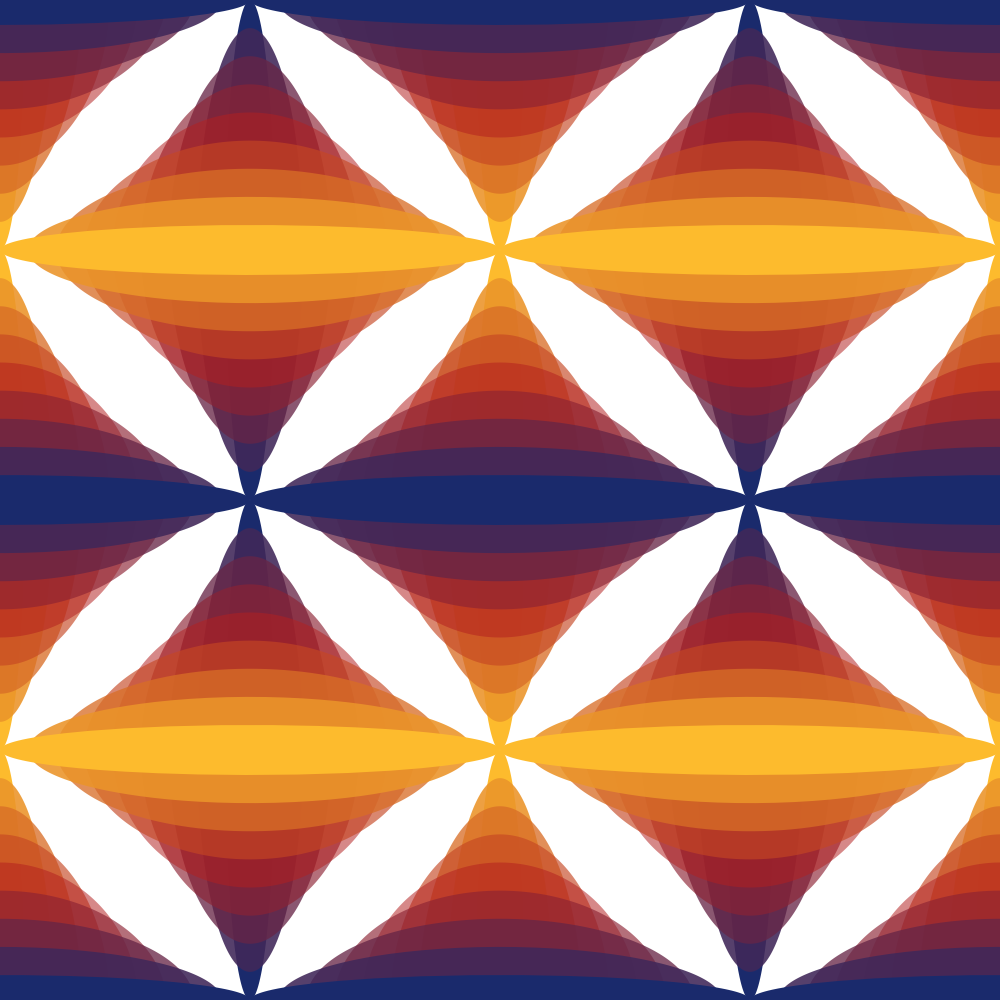
public class EllipseDraw : MonoBehaviour
{
    Drawer drawer;
    Color c1 = ColorUtils.ColorHEX("#1a2a6cff");
    Color c2 = ColorUtils.ColorHEX("#b21f1f88");
    Color c3 = ColorUtils.ColorHEX("#fdbb2dff");

    void Start()
    {
        SpriteRenderer spriteRenderer = GetComponent<SpriteRenderer>();
        drawer = new Drawer(spriteRenderer);
        drawer.NewEmptySprite(10, 10, 100, Color.white);

        List<Color> gradColors1 = new List<Color>() {c1, c2, c3};
        List<Color> gradColors2 = new List<Color>() {c3, c2, c1};

        foreach (float x in new float[2] {2.5f, 7.5f}){
            foreach (float y in new float[2] {2.5f, 7.5f}){
                DrawEllipses(new Vector2(x, y), spriteRenderer, gradColors1);
            }
        }

        foreach (float x in new float[3] {0, 5, 10}){
            foreach (float y in new float[3] {0, 5, 10}){
                DrawEllipses(new Vector2(x, y), spriteRenderer, gradColors2);
            }
        }

        drawer.SavePng("Ellipses_draw");
    }

    private void DrawEllipses(Vector2 center, SpriteRenderer renderer, List<Color> gradient)
    {
        int nSteps = 8;
        float axisX0 = 0.25f, axisX1 = 2.5f;
        float axisY0 = 2.5f, axisY1 = 0.25f;

        for (int i = 0; i < nSteps + 1; i++)
        {
            float x = i / (float)nSteps;
            float axisX = Mathf.Lerp(axisX0, axisX1, x);
            float axisY = Mathf.Lerp(axisY0, axisY1, x);
            Color c = ColorUtils.Gradient(x, gradient);
            Ellipse el = new Ellipse(center, axisX, axisY, 0, c);
            drawer.Draw(el);
        }
    }
}